Tiered Pricing in Mystore (B2B)
Tiered pricing in Mystore allows you to offer different prices for a product based on the quantity purchased. By setting multiple price slabs, you can encourage bulk buying while maintaining flexible pricing for single or low-quantity orders. This feature is especially useful for B2B sellers, helping you attract larger orders and improve overall sales value.
Prerequisite: Enable B2B
Tiered pricing is available only for B2B products.
Before setting it up, make sure B2B is enabled for the product/store.

How Tiered Pricing Works?
- You set a default product price.
- Then, you create tiered price slabs based on quantity.
- Discounts are automatically applied when buyers add quantities that fall within a defined slab.
Steps to Set Up Tiered Pricing
1. Go to Product Pricing
Open the product from the seller dashboard and enter the product price. This price will be treated as the default price when no tiered slab is applied.
2. Enable Tiered Pricing
Enable the option “Do you have tiered pricing?” to activate tiered pricing for the product.
3. Choose Tiered Price Type
Select the tiered pricing type based on your business requirement.

Percentage Discount – discount applied as a percentage of the base price
- Fixed price:
Flat Discount – fixed amount discounted per unit
4. Add Tiered Price Slabs
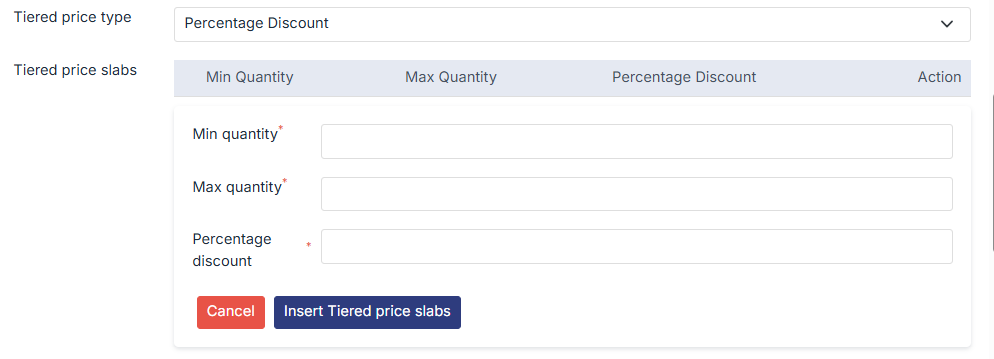
Click on Add Record and enter the minimum quantity, maximum quantity, and discount value. Once the details are filled in, insert the tiered price slab to save it.
5. Add Multiple Slabs if Required
You can add multiple slabs to offer increasing discounts for higher quantities. Existing slabs can be edited or removed using the Action option.
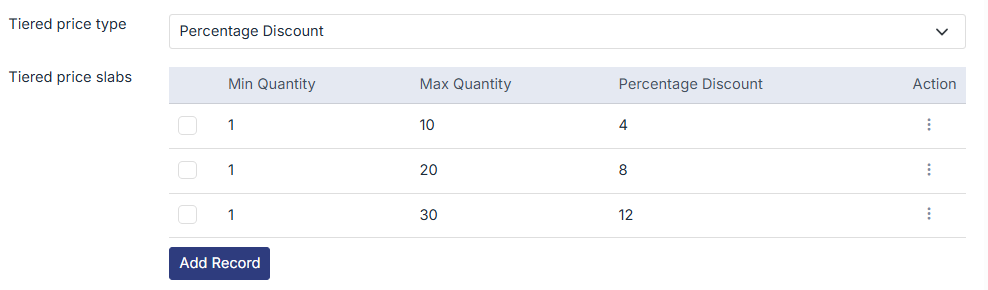
You can edit or delete slabs using the Action menu.

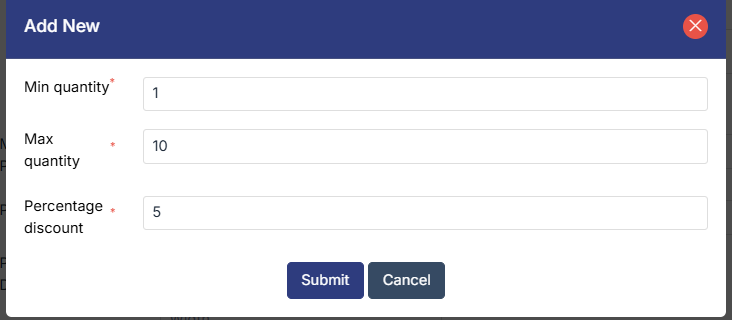
To edit the existing slabs, click on action menue > edit, the following page will appear, from here you can make the required changes.