
AI Credits
AI Credits
Mystore uses one shared AI Credits balance for supported AI-powered tools. When you use any of these tools, credits are deducted from the same balance. This makes it easier to monitor usage and purchase additional credits from one place.
What are AI Credits?
AI Credits let you use AI-powered features in your seller dashboard. Instead of maintaining separate limits for each feature, Mystore provides one shared balance across supported AI tools.
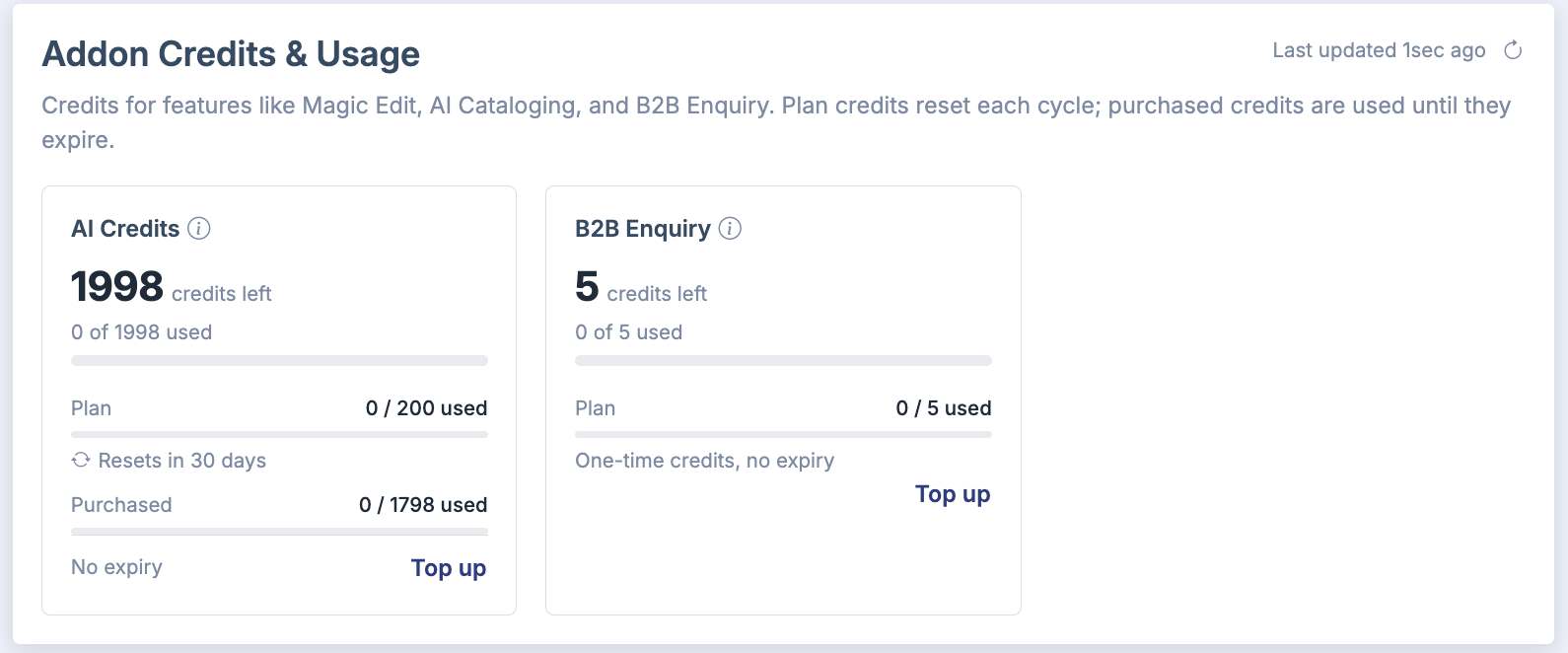
Your available balance may include credits provided with your subscription plan and credits purchased separately. The current balance and its source-wise breakdown are available in Billing Overview.
Important: AI Credits are separate from B2B Enquiry credits. Using or purchasing one does not change the balance of the other.
Features that use AI Credits
The shared AI Credits balance is used by supported features such as:
- Magic Edit - enhance or transform product images using AI.
- Generate Product Details Using AI - generate product names, descriptions, attributes, dimensions and other catalog information from product images.
- Theme Generator - create and refine storefront themes with AI assistance.
Additional AI-powered features may use the same balance as they become available. Feature availability can depend on your plan and the current Mystore rollout.
Where your AI Credits come from
You can hold plan credits and purchased credits at the same time.
| Source | How it works |
|---|---|
| Plan credits | AI Credits included with an eligible subscription plan. The AI Credits card shows the available balance and the next reset date. Unused plan credits do not accumulate after a reset. |
| Purchased credits | Additional credits bought through an AI feature or Billing Overview. The purchase dialog and AI Credits card show the applicable package conditions and expiry information. |
Mystore automatically uses the credit allocation that will reset or expire first, helping reduce unused credits.
How credits are calculated and consumed
AI tasks do not always consume the same number of credits. Usage depends on the amount and complexity of AI processing required. A simple edit or short response may use fewer credits than generating a complete theme or processing a detailed request.
Mystore measures each AI request and deducts the calculated usage from your shared balance. The seller dashboard displays balances as whole credits for easier reading, so the visible balance may change after an AI task completes.
Tip: Before starting an AI task, review your available balance. Longer tasks can involve several AI processing steps and may consume more credits than short actions.
How to check your AI Credits balance
- Sign in to your Mystore seller dashboard.
- From the left sidebar, select Plans and Billing.
- Open Billing Overview.
- Locate the AI Credits card.
The card shows your available credits, used credits, and the balance split between plan and purchased credits. It also displays the applicable reset or expiry information.
Some AI tools also show your current balance while you work. Use the refresh option, where available, to retrieve the latest balance after completing an AI task or purchasing credits.
How to purchase additional AI Credits
You can open the purchase dialog in any of these ways:
- Click Top up on the AI Credits card in Billing Overview.
- Click the purchase or top-up option shown inside a supported AI tool.
- Click Top up credits when Mystore informs you that the balance is insufficient or exhausted.
To complete a purchase:
- Open the AI-credit purchase dialog.
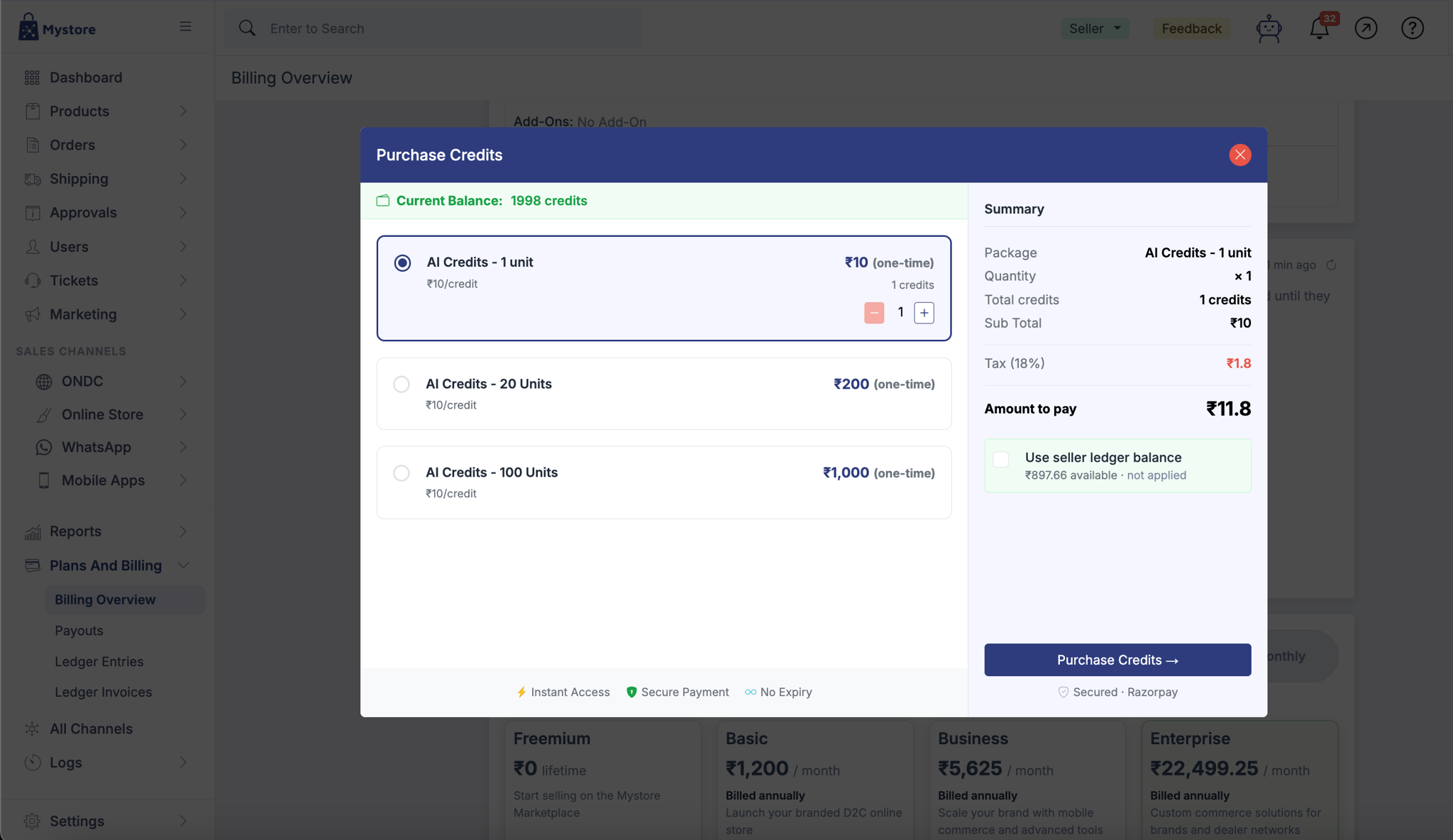
- Select one of the currently available credit packages.
- Choose the quantity, if the option is available.
- Review the package details, amount, applicable taxes and expiry conditions.
- Click Purchase Credits and complete the payment.
After a successful purchase, the new credits are added to your shared AI Credits balance. The packages, prices, taxes and validity shown in your dashboard at the time of purchase are authoritative.
What happens when credits run out
If your balance is insufficient before a new AI task starts, Mystore stops the request and displays an option to purchase more credits. You can top up immediately or wait for eligible plan credits to reset.
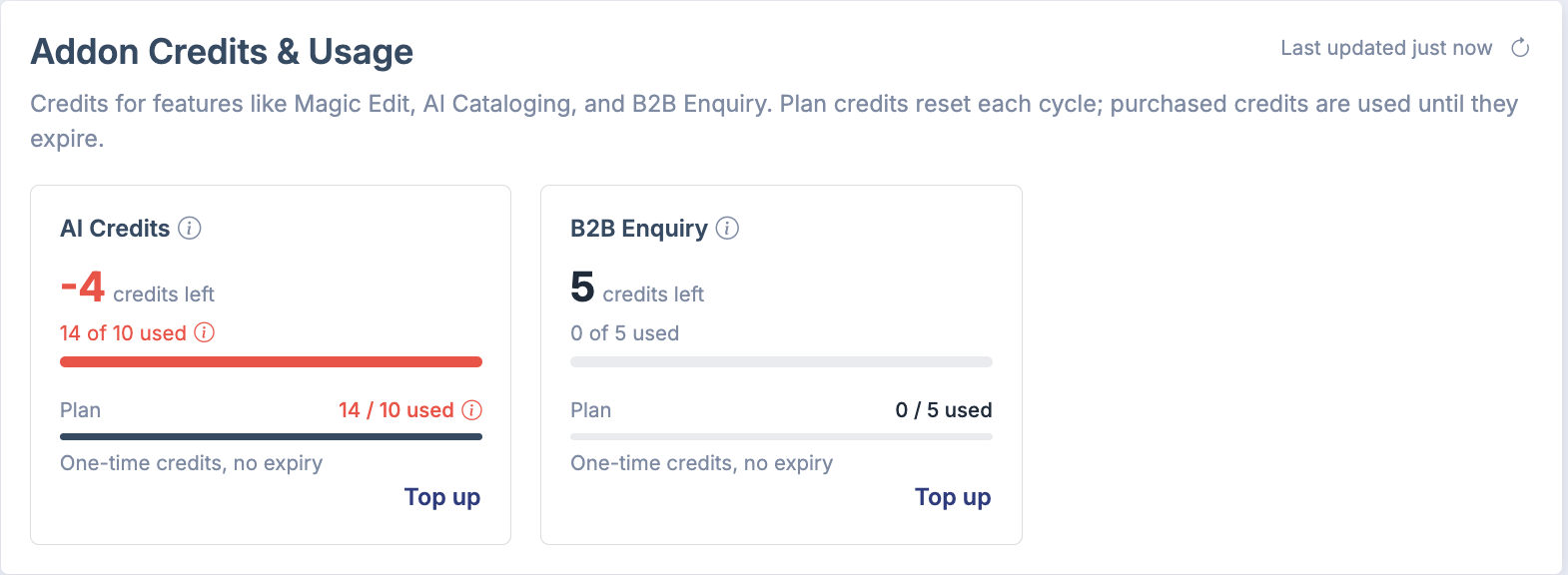
A longer AI task may use the last available credits while it is already running. In that case, Mystore completes the AI step already in progress and then stops additional processing. After credits are added or reset, you can continue editing or run the required action again.
Why a balance can be below zero: An AI step that had already started may finish and be charged. A later top-up or plan reset first accounts for that usage before increasing the available balance.
Reset and expiry rules
- Plan credits reset according to the schedule shown in Billing Overview. Unused plan credits do not roll over or accumulate.
- Purchased credits follow the expiry conditions displayed for the selected package. Check these conditions before completing payment.
- When more than one credit allocation is available, Mystore uses the one reaching its reset or expiry first.
- Expired credits cannot be used. The AI Credits card shows the active balance and the next relevant reset or expiry information.
Frequently asked questions
Do Magic Edit and product-detail generation have separate balances?
No. Supported AI features use the same AI Credits balance. Usage in one feature reduces the balance available to the others.
Does every AI action cost one credit?
No. Credit usage depends on the processing required for the request. Different tasks can consume different amounts.
Why did my balance change by more than expected?
Complex tasks can involve multiple AI processing steps. Refresh the AI Credits card after the task finishes to view the latest balance.
Which credits does Mystore use first?
Mystore uses the active allocation that will reset or expire first. This applies automatically when plan and purchased credits are both available.
Where can I see current package prices and validity?
Open the AI-credit purchase dialog. It displays the packages currently available to your store, including the applicable price, taxes and expiry conditions.
Are B2B Enquiry credits part of AI Credits?
No. B2B Enquiry credits are tracked separately from the shared AI Credits balance.