
B2B Product Enquiries
The Product Enquiry system on Mystore allows buyers to send product enquiries directly to sellers. Sellers can view these enquiries in their dashboard and unlock the lead details using credits.
This system helps sellers connect with serious buyers and convert enquiries into business opportunities.
How the B2B Enquiry System Works
1. Enable B2B for your account
In order to receive Product enqueries in your B2B store, you need to enable the B2B Enquiry system for your account; you need to configure the product with the correct settings. Follow the steps below to enable B2B manually.
- Go to product section from seller dashboard
- Add or Edit a Product
- Go to the product you want to enable for B2B enquiries.
- Set Order Mode
- Change the Order Mode to BuyQ (Order + Query)
- This allows buyers to send an enquiry instead of placing a direct order.

- Set Product Visibility
- Set visibility to Business Users (only Business users with valid GST numbers can raise product enquiry)and Public so that both business users and general users can view and send enquiries for the product.

Once these settings are configured, buyers will be able to submit enquiries for the product through the B2B enquiry flow.
2. Buyer Sends a Product Enquiry
A buyer can send a product enquiry directly from the product page by:
- Selecting the required quantity
- Adding a message (optional)
- Clicking Send Enquiry
Once submitted, the enquiry is generated in the system and assigned to the respective seller.
3. Seller Receives the Enquiry
When a new enquiry is received:
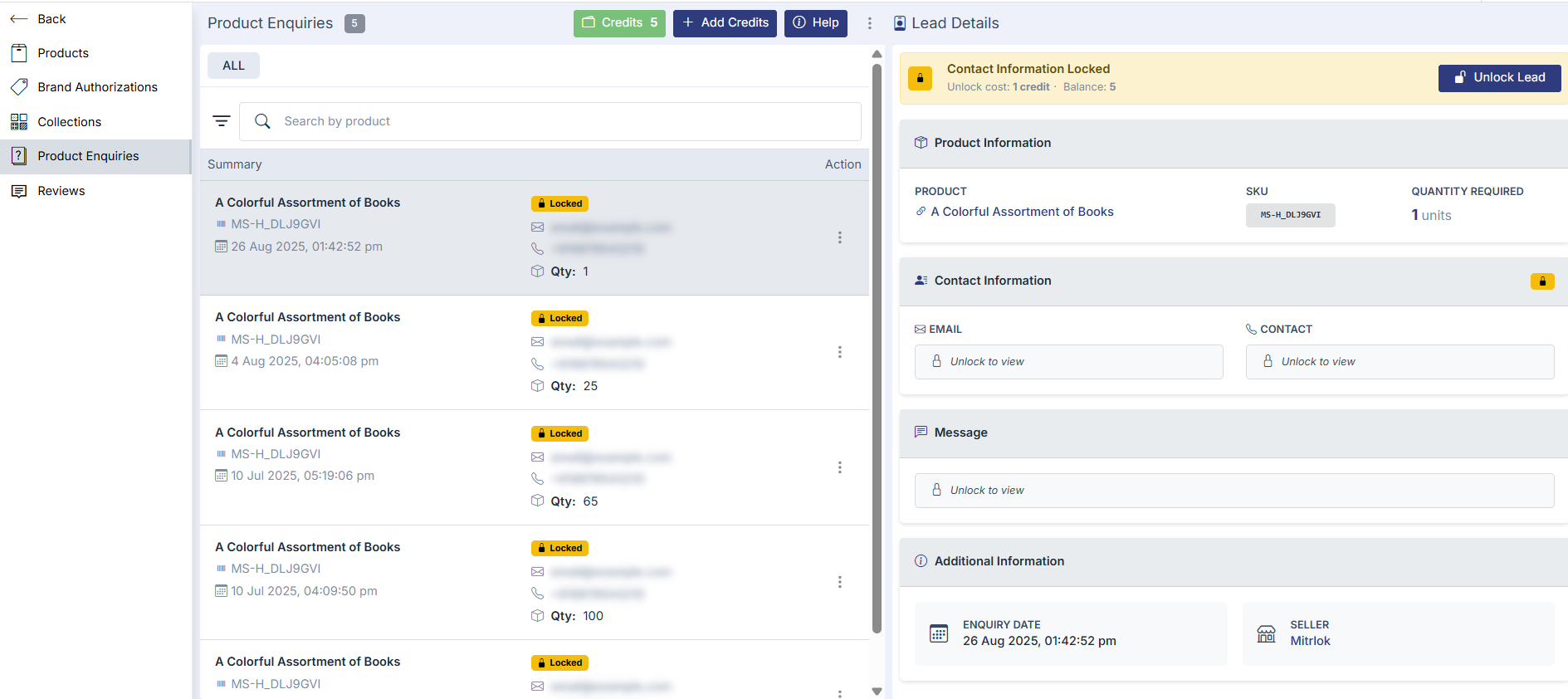
- You can log in to Seller Dashboard go to Products > Product Enquiry to see all list of product enquiries from customers
At this stage, only limited information is visible.
4. Locked Enquiry View
Before unlocking, the seller can see:
- Product name
- Requested quantity
- Date of enquiry
However, the following details remain hidden:
- Buyer phone number
- Buyer email ID
- Complete enquiry message
- Buyer contact details
To access these details, the seller must unlock the lead using credits.
Unlocking an Enquiry
Each enquiry can be unlocked using 1 credit. The credit system is 1 Enquiry = 1 credit.
Steps to Unlock
- Go to Seller Dashboard → Products> Product Enquiry
- Select the enquiry you want to view
- Click Unlock Lead
- Confirm the action
Once unlocked, the seller can view buyer contact details, full enquiry information, and Product requirement details
To help sellers get started:
- The first 5 enquiries are free
- After the free enquiries are used, sellers will need to purchase credits to unlock additional leads.
Purchasing Credits
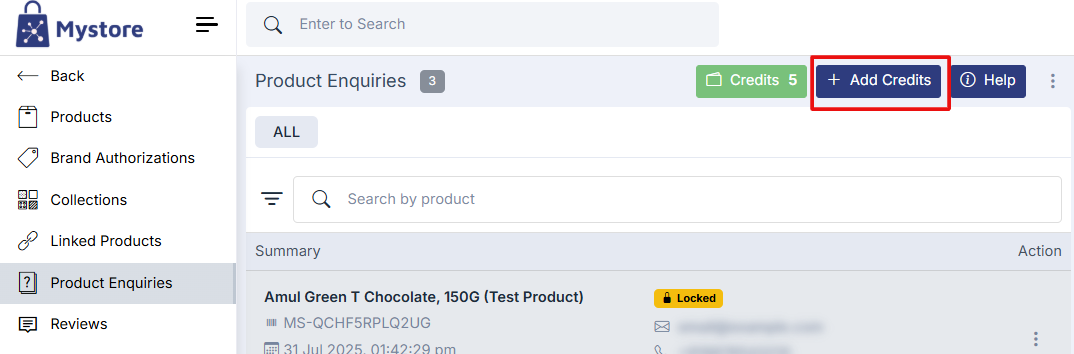
If you do not have enough credits:
1. Click Add Credits
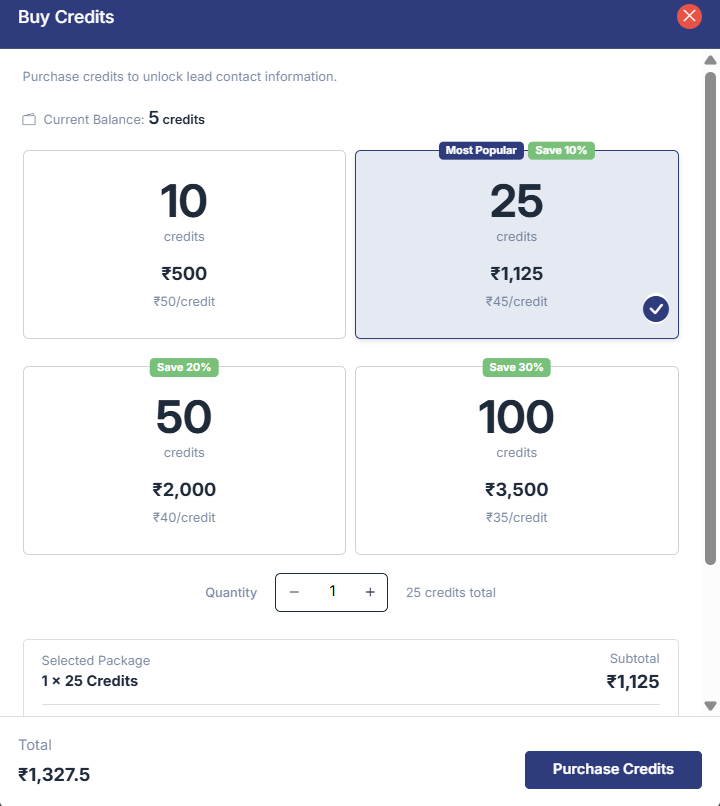
2. Select a credit package
Sellers must purchase credits in predefined packages.
Available Credit Packages
Credits | Price | Discount |
10 Credits | ₹500 | No discount |
25 Credits | ₹1125 | 10% discount |
50 credits | ₹2000 | 20% discount |
100 credits | ₹3500 | 30% discount |
Credit Validity
Currently, credits do not expire. Once purchased, they remain available in the seller account until used.
3. Complete the payment
Select payment method and proceed to making payment
Payment Methods Supported
- UPI
- Debit Card
- Credit Card
- Seller ledger balance (if available)
Lead Notifications & Reminders
When a new enquiry is received:
- Sellers receive a notification reminder
- The enquiry remains available in the dashboard until it is unlocked.
Once the enquiry is unlocked:
The seller can:
- Contact the buyer directly
- Share pricing
- Negotiate order terms
- Finalize the deal offline
Currently, the enquiry system focuses on lead generation only.