
Enable ONDC selling
Enable ONDC selling (KYC)
ONDC KYC is no longer part of signup - it is a separate step you complete when you are ready. You can start it from the dashboard banner, from Start KYC on the checklist, or from ONDC under Sales Channels in the left panel.
Have it ready? If you already have your GSTIN and bank details to hand, add them now. Our team reviews your submission and approves your listing, usually within 1–2 business days - after that your catalog goes live across ONDC buyer apps.
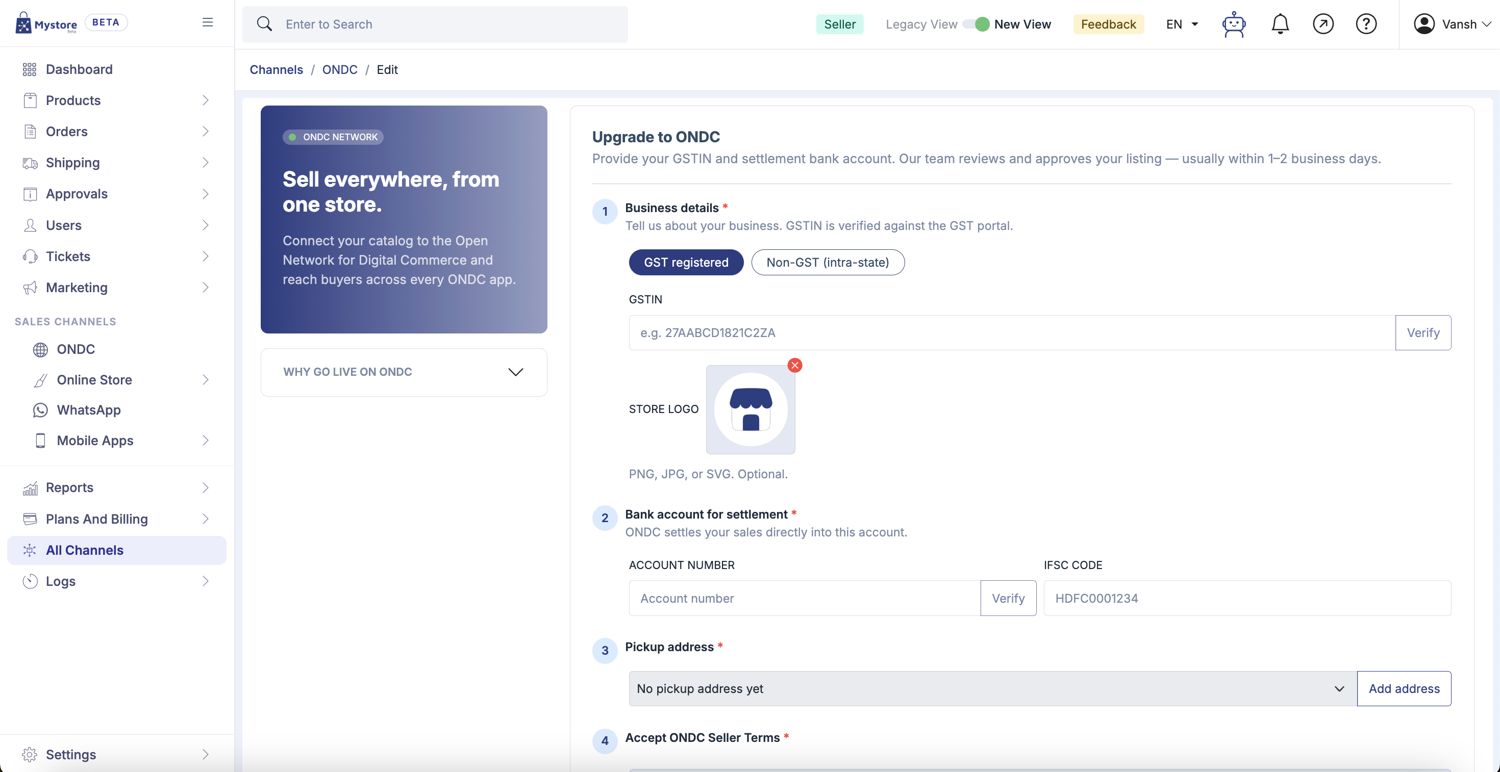
Step 1 - Business details
Choose your tax registration type:
- GST registered: Enter your 15-digit GSTIN and click Verify. It is checked against the GST portal.
- Non-GST (intra-state): For sellers without GST registration, selling within their own state.
You can also upload a store logo here (PNG, JPG or SVG). This is optional.
Step 2 - Bank account for settlement
ONDC settles your sales directly into this account. Enter your account number, click Verify, and enter the IFSC code.
Step 3 - Pickup address
Select a saved pickup address from the dropdown. If you have not added one yet it will show No pickup address yet - click Add address to create it.
Step 4 - Accept ONDC seller terms
Tick the box to accept the ONDC Seller Terms (catalog standards, return-policy norms, and dispute resolution via the ONDC protocol), then submit for approval.