Search Engine Optimisation (SEO)
Search Engine Optimization (SEO) is the process of optimizing your store so that it ranks higher in the search results of various search engines. SEO helps in increasing the visibility of your store on the internet and is thus instrumental in the success of your online store.
Mystore acknowledges the importance of SEO and thus includes comprehensive SEO tools in all of its plans.
- Clean configurable URL schema for all entities.
- Editable Title, keywords and meta description for all entities.
- Automatically generated Sitemap and Robots.txt with the ability to upload custom Sitemap.
- Optimized themes with best practices for online SEO implemented.
- Support for the caption or alt tags in all images.
SEO elements
In this segment, we would explain some common SEO elements which are essential to give your website higher ranking by optimizing your product pages, blog, static page, etc.
Title
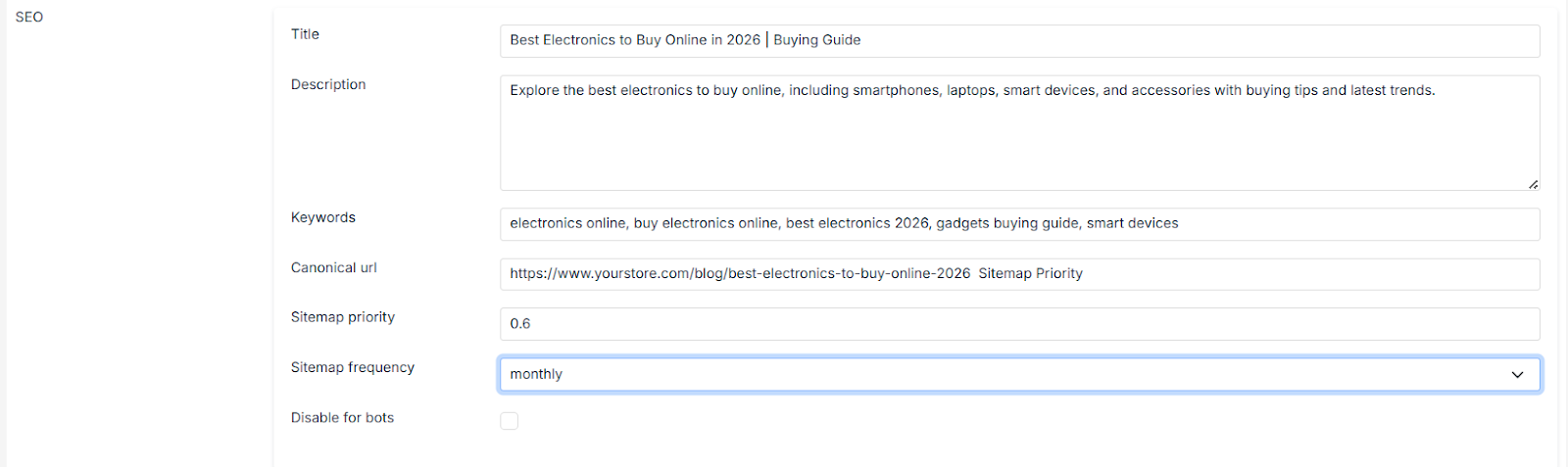
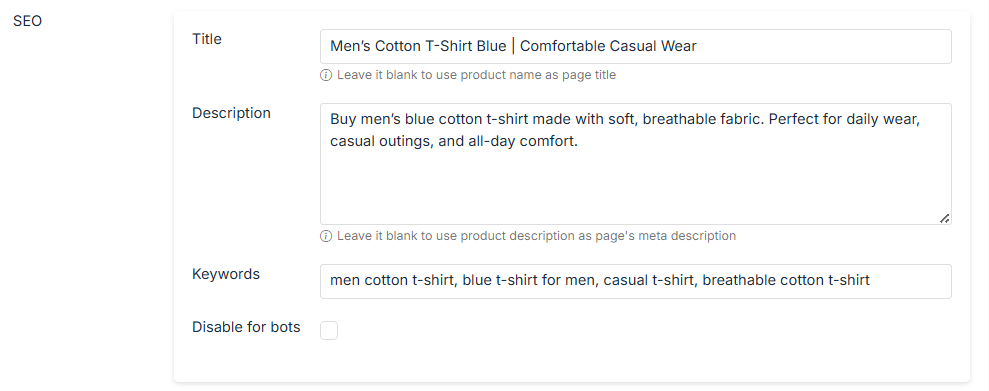
You can set the title for different resources in different entities (e.g. product, blog, category pages, static pages, etc.). The title is used in <title> tag in the store themes and displays in the browser window when you load the particular resource page. The title also appears in the search engine results when somebody searches for your brand. If the title is not present then usually resource name is used as the title.
A well-written title with an apt use of keywords can help you get more clicks on your website link during searches. You should also include your business/ brand name and how it will help customers in achieving something. It is advisable to keep the title length up to 60 characters as most search engines truncate longer titles.
Meta Description
The Meta description is the brief text that displays the search engine results for the resource. Keep the description small and impactful ( up to 160 characters) while still highlighting the unique features of the product. Also, include keywords but do not overuse them to the extent that confuses your users/buyers. A good description will attract more people to visit the page in your store and thus will lead to better conversions.
Keywords
Keywords are the phrases used by people to search for something on search engines. Using these search phrases in your SEO activities can give your website a better chance of being found by users. There are many tools to find the keywords for your specific industry like Google Keyword Tool. It gives you a combination of keywords and the search volume on each one of them.
Meta Tags
Meta tags are snippets of text that describe a page’s content that only appears in the code of the page. The meta tags are the content descriptors that help the search engines to know what a web page is about.
Meta tags are only visible to search engines. It only exists in HTML, usually at the “head” of the page.
Structured Data
Structured data is a standardized format for providing information about a page and classifying the page content. Google uses structured data that it finds on the web to understand the content of the page. Mystore provides support for adding structured data in theme pages.Image SEO- What steps we take for image SEO—an SEO topic.
Home Page Priority
Enter the sitemap priority for the home page of the store. The sitemap priority is used by crawlers to determine the importance of the page as compared to other pages. Please enter a value between 0 and 1. The default sitemap priority is 0.5.
Sitemap
All Mystore stores automatically generate a sitemap.xml file that contains all your products, categories, pages, and blog posts. It also supports Google's Image Sitemaps extension. Your sitemap file is located at sitemap.xml at your store's URL.
Robots.txt
There is an auto-generated robots.txt file for each Mystore's store that contains the directives for search engines. Also, you can update/edit the custom robots.txt file.
Google Search Console
Google Search Console is a free Google tool that helps MyStore sellers understand how their store appears on Google search. It shows how customers find your products, which pages are ranking, and if there are any issues affecting visibility.
In Google Search Console, the Pages / Indexing and Enhancements sections help you identify website issues. You can find errors like broken links, pages not indexed, server errors, redirect issues, and mobile usability problems. Fixing these issues ensures your MyStore pages load correctly and remain visible on Google search results.
The Performance → Search results section shows the words customers type on Google to find your website. It tells you how many people clicked your store, how many times it appeared in search results, the click-through rate (CTR), and your average ranking position. This helps you know which keywords bring traffic and lets you improve your product titles, descriptions, and content to rank better on Google.
Sellers can use it to track website traffic, improve SEO, fix indexing errors, and submit pages to Google. It also helps identify top search keywords, best-performing pages, and mobile usability issues. You are required to verify your domain in Google Search Console, which helps in listing your domain in Google SERP. By regularly checking Google Search Console, sellers can increase organic traffic, improve search rankings, and grow sales without paid ads.
Redirects
Every URL has its SEO ranking over the period of time. Once you change a URL, you might lose the SEO ranking. When you redirect the old URL to a new URL, the ranking of the old URL is passed to the new URL.
Mystore allows you to redirect the old URLs to the new URLs. You may need to redirect URLs in the following cases:
- When you change a page's URL
- When you move your e-commerce store to Mystore from another platform
- If you have an old website and want to use its domain for your new store
If you don't redirect the path of these old URLs to your new store, you can confuse customers, damage your SEO, and impact your site traffic.
Image SEO
Images equally contribute to the SEO of the site. You need to fully optimize an image for SEO and provide some pointers on using images for the best user experience. Google extracts information about the subject matter of the image from the content of the page, including captions and image titles. Mystore provides you support for image SEO.
- Image title: Name your images properly. For example, the image of the ball can be ball.jpg instead of ball-downloaded.jpg.
- Scale image size: Image size and responsiveness play an important role in image SEO. You can set the height and width of the images either in pixels or in percentages.
- Alt tag: Alt text, or alternative description, describes an image. It’s what the browser displays to users with screen readers. Browsers also display alt text if there’s a problem rendering images.
- Caption: The image caption is the text that accompanies the image on the page. You can add the caption for image SEO.
- Image file types supported: All the major image file types, such as Webp, JPG/JPEG, PNG, and so on, are supported.
Significance of SEO for Your mystore.in Storefront
- Enhanced Visibility: Superior search engine rankings expose your product offerings to a larger pool of prospective buyers.
- Targeted User Acquisition: Organic traffic comprises individuals with a specific purchase intent, resulting in improved conversion rates.
- Economical Marketing Strategy: Once SEO is effectively implemented, the resulting traffic incurs no direct per-click cost.
- Establishment of Trust and Authority: Websites ranking prominently are often perceived as more reliable and authoritative by users.
- Sustainable Business Growth: SEO provides a continuous source of potential customers, contributing to the long-term viability of your business.
Domains of SEO for mystore Vendors
Successful optimization of your mystore.in presence necessitates attention to several key areas, each explored in detail within subsequent articles of this guide:
- Strategic Product Taxonomy: The organization and categorization of your product inventory are fundamental to SEO efficacy. A well-structured Product Taxonomy enables search engines to accurately index your offerings and match them with relevant user searches. Best practices for developing a logical and search-optimized category framework for your mystore.in store will be examined.
- Product Catalogue Optimization: Your Product Catalogue serves as a primary interface for customer engagement. Each product listing presents an opportunity to attract buyers through pertinent keywords, compelling descriptions, and precise specifications. Guidance on optimizing product titles, descriptions, and attributes to enhance their visibility in search results will be provided.
- AI-Powered Image Enhancement for SEO: High-quality visual content is paramount in online retail. Utilizing AI to enhance product images can improve their aesthetic appeal and contribute to improved SEO through optimized file naming conventions and alt text implementation. Strategies for leveraging product visuals to enhance search engine discoverability will be discussed.
- Content Marketing via Blog Articles: The creation of valuable and informative blog articles for your store can significantly bolster your SEO efforts. By addressing customer needs, answering common inquiries, and offering relevant content pertaining to your products, you can attract a broader audience, establish domain expertise, and drive organic traffic to your product listings.
While the intricacies of SEO can be extensive, a systematic approach is key. Begin by identifying your target customer base and the search terms they employ. Subsequently, focus on refining your store's organizational structure, product listings, and visual assets.
SEO in entities in Mystore
For making your store Search Engine Optimized you just need to make some small modifications overall within the store, which will have a positive impact on your site's user experience and performance in organic (unpaid) search results.
Mystore allows you to provide custom information needed for effective SEO of your website pages. You can provide the SEO information for the following entities in Mystore Admin Panel:
- Adding products
- Categories
- Collections
- Blog/Blog Posts