
Setting Cashfree as the payment gateway
Mystore has integrated the API of the Cashfree payment gateway. You can add Cashfree as the payment gateway in your store. With Cashfree, you can seamlessly collect payment from your customers. It gives you the fastest way to collect payments and making payouts.
Setting up Cashfree as the payment gateway in your store is a two steps process, viz creating a Cashfree account and getting keys, and setting it as the payment method in your store.
Creating Cashfree account
To create a Cashfree account follow the steps mentioned below:
- Register on the Cashfree.
- If you already have an account, you can go to the Cashfree dashboard.
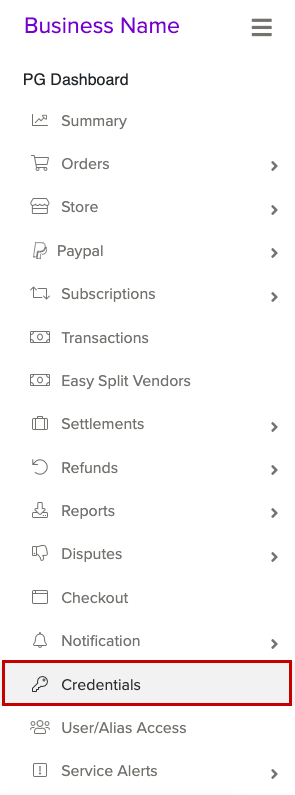
- In the left navigation panel, click the Credentials option.
- Click the Get Credentials button to generate the test mode credentials.
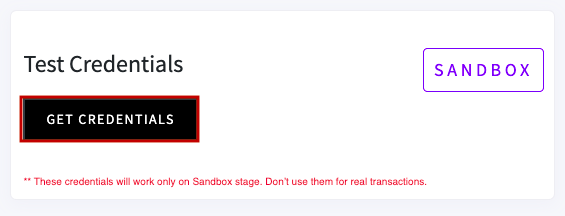
- To generate a key for Production mode, you must activate the account.
- Get the App id and Secret Key.
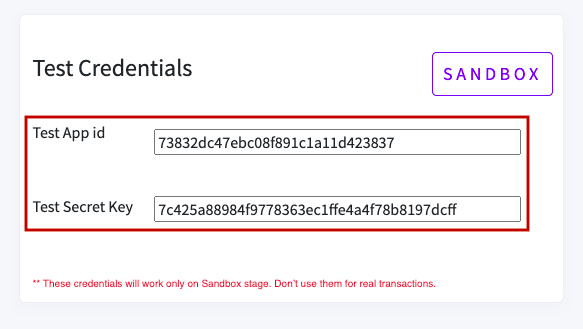
Note: You need to generate separate API Keys for the Production mode and no charges would be levied in case of Test mode.
Setting up the payment method
After you have got the API keys, you can proceed to set up Cashfree as the payment method in your Mystore admin panel from setting>Payement methods.