
Ledgers Entries
Sellers can view all ledger entries related to their store’s transactions, including credits, debits, taxes, and fees.
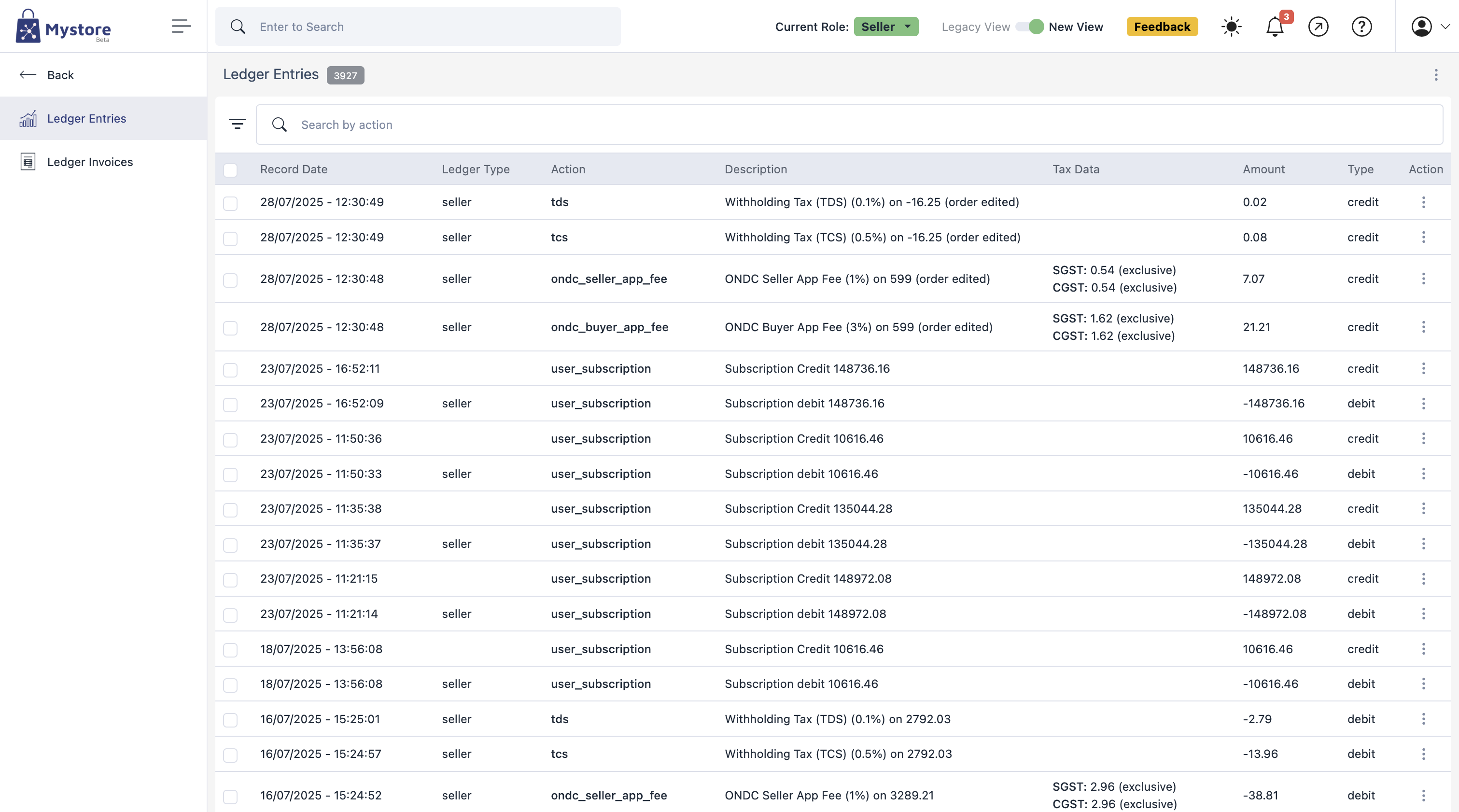
Steps
- From the mystore dashboard, go to Plans & Billing > Ledger Entries.
- The page will display a list of all ledger entries. Each entry contains:
- Record Date – The date and time the transaction was recorded.
- Ledger Type – The account type the transaction relates to (e.g., seller).
- Action – The type of transaction performed (e.g., user_subscription, tds, tcs, order_amount_credit).
- Description – A short explanation of the transaction (e.g., subscription credit, withholding tax).
- Tax Data – Tax information related to the transaction (e.g., IGST amount).
- Amount – The transaction value.
- Type – Indicates if the transaction is a credit (added to balance) or debit (deducted from balance).
- Action Menu – Options to view more details or perform actions on that ledger entry.
Was this page helpful?